Usage
After the config file is set up properly, run the application with:
python3 src/main.py
This opens the graphical user interface (GUI) providing access to all functionalities described in Key Features.
Keyboard Shortcuts
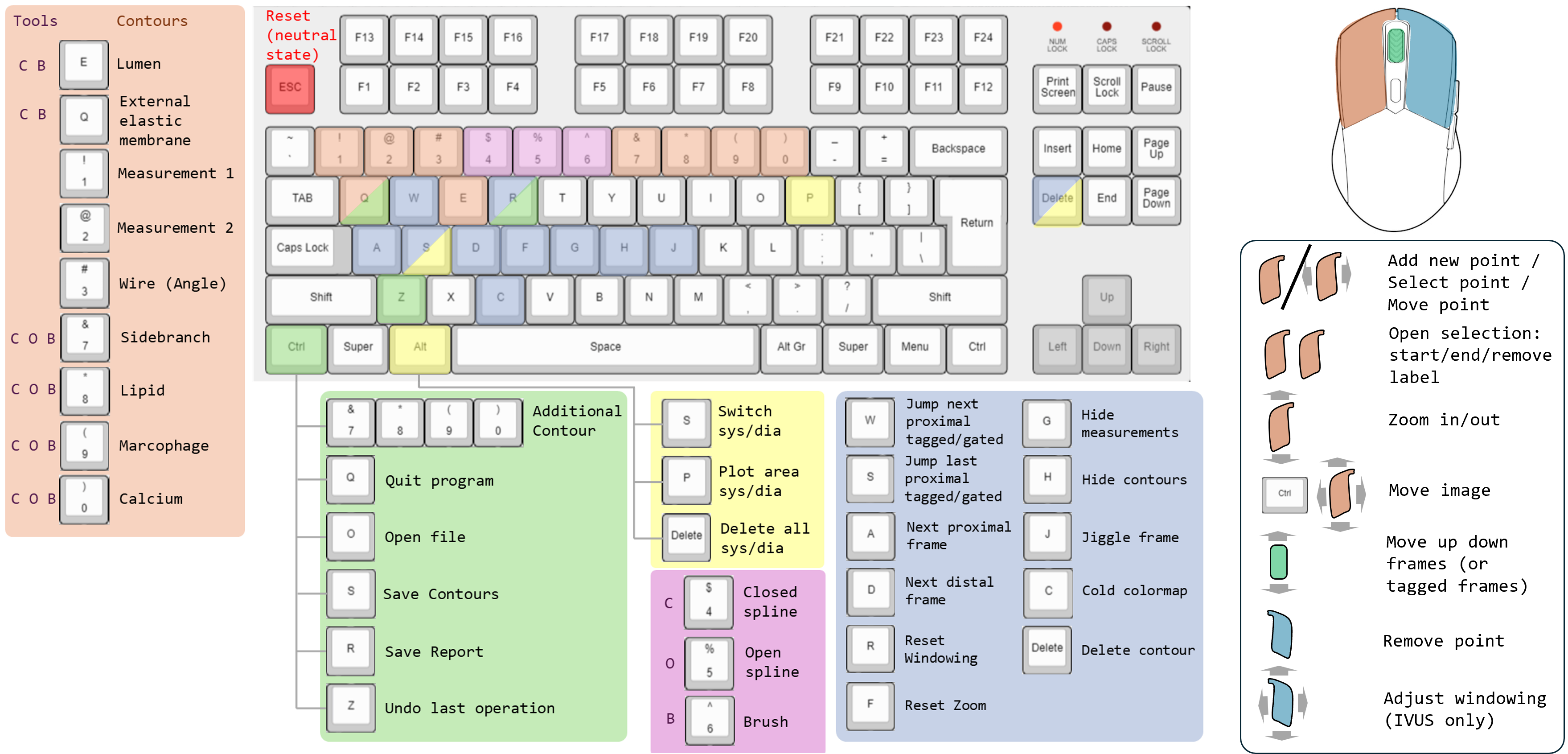
v1.0.0 (Base module)
Ctrl+O — Open a DICOM/NIfTI file
A / D — Move through frames (previous/next)
W / S — Move through gated (diastolic/systolic) frames (select phase via the corresponding button: blue = diastolic, red = systolic)
E — Draw a new lumen contour
Ctrl+Z — Undo (e.g. restore an accidentally deleted contour)
1 / 2 — Draw measurement 1 and 2, respectively
RMB (hold) — Windowing; R to reset
C — Toggle color mode
H — Hide all contours
J — Jiggle around the current frame
Ctrl+S — Manually save contours (auto-save is enabled by default)
Ctrl+R — Generate report file
Ctrl+Q — Close the program
Alt+P — Plot results for gated frames (area difference systole/diastole by distance)
Alt+Delete — Define a range of frames to remove gating
Alt+S — Define a range of frames to switch systole and diastole in gated frames
v1.1.0 and higher
Additional shortcuts available from version 1.1.0:
Esc — Exiting drawing mode (return to neutral state)
RMB on a knot point — Remove that point
MW (scroll) — Scroll through images
LMB (hold) — Zoom in/out current mouse position (reset with F)
Ctrl+LMB — Move the image inside it’s widget
Q — Draw an
external elastic membrane(EEM) contour7 — Draw a
calcificationcontourCtrl+7 — Add an additional
calcificationcontour in the current active spline tool (open or closed)8 — Draw a
side branchcontourCtrl+8 — Add an additional
side branchcontour in the current active spline tool (open or closed)9 — Draw a
lipidcontour (open spline only)Ctrl+9 — Add an additional
lipidcontour0 — Draw a
macrophagecontour (open spline only)Ctrl+0 — Add an additional
macrophagecontour